
Most practices check two numbers on Google: the star rating and the review count. If both look good, everyone relaxes.
But stars are a final grade. The real feedback lives in the words patients write, and most teams never read those words side by side.
That's where AI earns its keep. Think of it as a tireless reader that scans a year of reviews and tells you what keeps coming up. It's one of the clearest examples of how AI supports dental teams without replacing anyone. You still make the decisions. AI just does the reading.
Here's the catch. AI answers the question you ask, not the question you meant.
Type "summarize my reviews" and you'll get a polite paragraph about your friendly staff. Ask a sharper question and you'll get a to-do list. Knowing what AI can and can't do helps here too: it's great at sorting and counting, but it can't guess what you care about unless you tell it.
Every strong prompt has four simple parts. We call them the four R's:
That's it. No tech skills required. ChatGPT, Claude, or Gemini all handle this well.
Here's how three practices used the four R's to audit themselves.
Tasha manages the front office at a busy family practice outside Raleigh. Her first prompt was simple: "What do new patients mention most before they ever sit in the chair?"
Fourteen reviews mentioned paperwork, with phrases like "so many forms" and "had to repeat my info twice." The intake packet hadn't changed in years, so the team had stopped seeing it.
Tasha switched to digital forms texted before the first visit. A few months later, she ran the same prompt again. Paperwork had dropped off the list, and "smooth check-in" had taken its place.
The takeaway: Your team gets used to the things it does every day. Patients don't.
Dr. Marcus Feld's practice in Tulsa sat at a 4.8, so everyone assumed things were fine. His office manager, Jo, tried a tougher prompt anyway: "Find any complaints or suggestions hiding inside four- and five-star reviews."
One theme jumped out. Ten happy reviews used words like "hurried" or "in and out." Patients liked Dr. Feld. They just felt he was always on his way to the next room.
His fix took about a minute per visit. Before leaving, he sat down, made eye contact, and asked, "What questions can I answer for you?" Within a few months, newer reviews started saying he "took time to explain."
The takeaway: A high rating can hide a pattern. Read the words, not just the stars.
Dr. Priya Shah runs a two-doctor practice near Sacramento. Tuesday evening appointments were hard to staff, and she was ready to cut them.
Before deciding, her team asked AI: "What do patients praise that a practice might take for granted?" The answer was Tuesday evenings. Seventeen reviews mentioned them, mostly from working parents who said those hours were why they chose the practice.
Dr. Shah kept the evenings. The real issue was booking, not demand, so she explored how AI can help with dental scheduling and added 24/7 online booking so those slots filled themselves.
The takeaway: Reviews don't just show what to fix. They show what to protect.
Yes. Your reviews are a mirror you can hold up to what you say about yourself. Try pasting your homepage text and your reviews into the same chat. Then ask: "Where does our website promise something patients never mention? And what do patients love that our website doesn't say?"
Maybe your site brags about technology while patients rave about your gentle hygienist. Rewrite your copy in your patients' words. It also helps you help AI understand your practice, since clear, specific content is what AI tools pull from when they describe you.
Because patients are already asking AI about you. AI search tools read your reviews and summarize them for people looking for a dentist, and Google's Gemini pulls from your Google Business Profile to answer local questions.
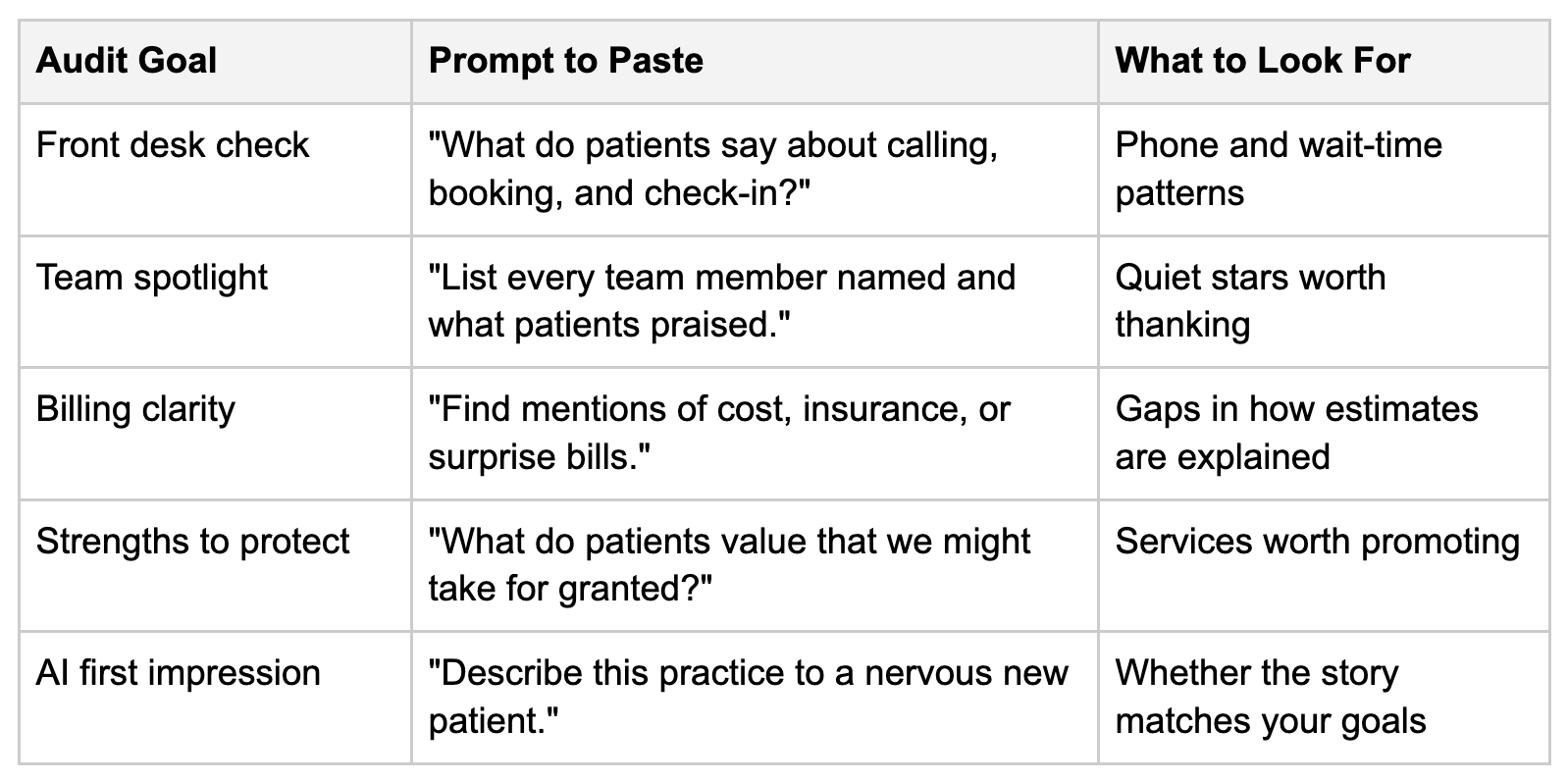
So run one more prompt: "Based only on these reviews, describe this practice to a nervous first-time patient." Whatever comes back is close to what a stranger might hear. It's a quick way to see how Google reviews help you show up in AI search, and whether the story matches the one you want to tell. When it does, you're in good shape to teach AI to recommend your practice.
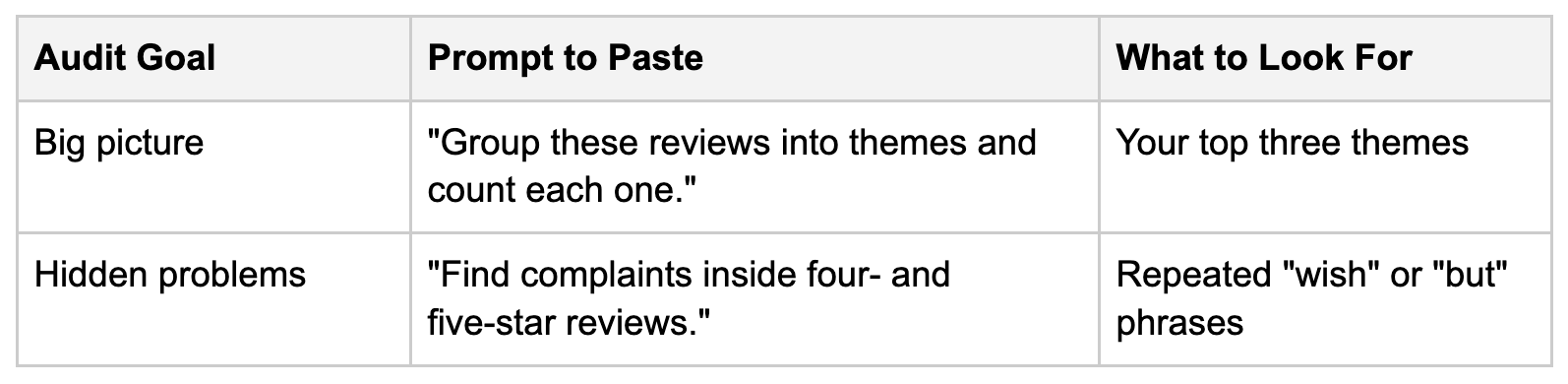
Here's a starter library. Add your Role line and reviews, then pick one.
You're not alone. Patients expect faster answers than ever, and it usually means your team is stretched thin, not failing. Tools that take admin work off your team's plate can help, and no, AI won't replace your front desk. It gives them room to focus on the patient standing in front of them.
Stick to public review text only. Never paste charts, appointment records, or insurance details into an AI tool. And when you reply to reviews, never confirm someone is a patient or mention their treatment.
Your Google reviews are a free report card from the people who know your practice best. AI helps you read it, as long as you ask good questions. Pick one prompt from the table this week, bring the results to your next team huddle, and choose one thing to fix and one thing to celebrate.
A: Paste your public review text into ChatGPT, Claude, or Gemini. Give it a role, a specific question, and an answer format, then look for themes in three or more reviews.
A: Start with "Group these reviews into themes and count each one." Once you see the big picture, ask sharper questions, like finding complaints hidden inside five-star reviews.
A: Yes. Paste both into one chat and ask where they don't match. You'll quickly spot strengths your marketing is missing.
A: Quarterly works for most practices. Reuse the same prompts so you can see whether a theme is shrinking or growing.
A: Public Google review text is generally fine. Never include charts, appointment details, insurance records, or anything that isn't already public.